
What's in the Pack
- JabberJaw PCB (pre-assembled, 50×50mm)
What You'll Need
- 9g micro servo (SG90 or similar)
- 5V power source (USB cable, battery pack, or adapter)
- Double-sided tape or hot glue
- Your puppet, mask, or monster creation
Quick Start
1
Connect the earBuds or microPhone
The audio pads on the board detect sound. Solder your audio wires to the pads. Place the earBuds or microPhone near your audio source.
2
Plug in the Servo
Connect your 9g servo to the 3-pin header on the board. Match the wire colors (see guide on right). The connector only fits one way — orange/yellow wire goes to the top pin.
3
Connect Power
Connect 5V to the board's power to the +5v pad. Red to + (positive), black/brown to − (ground). A USB cable stripped and wired works great. Battery packs (4×AA) work too.
4
Make Some Noise!
Talk, sing, tap, or play music near your creation. The audio-in picks up the sound and the servo moves the jaw automatically. The louder the sound, the more the jaw moves. That's it — you're done!
Wiring Guide
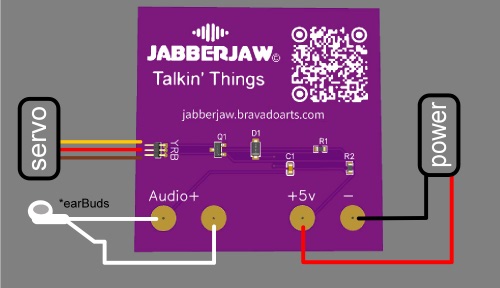
Servo Wire Colors
Orange/Yellow → Signal (Pin 1, top)
Red → V+ (Pin 2, middle)
Brown/Black → GND (Pin 3, bottom)
Video Example